Why do so many businesses feel short of tools when they already seem to have too many?
It is a problem I see regularly in the companies I support in La Rochelle and the surrounding area. They already have a CRM or business software designed for their line of work. On paper, everything looks coherent: the tool is specialised, well known in its market and supposed to save time.
In practice, it is often less simple than that.
As software tries to cover more and more use cases, it becomes more complex than genuinely useful for the team that has to work with it every day. Some features may well make sense for other companies in the same sector, but not for the one using the tool in real conditions. The result is familiar: the software is there, money is being spent on it, yet part of the work still gets done manually.
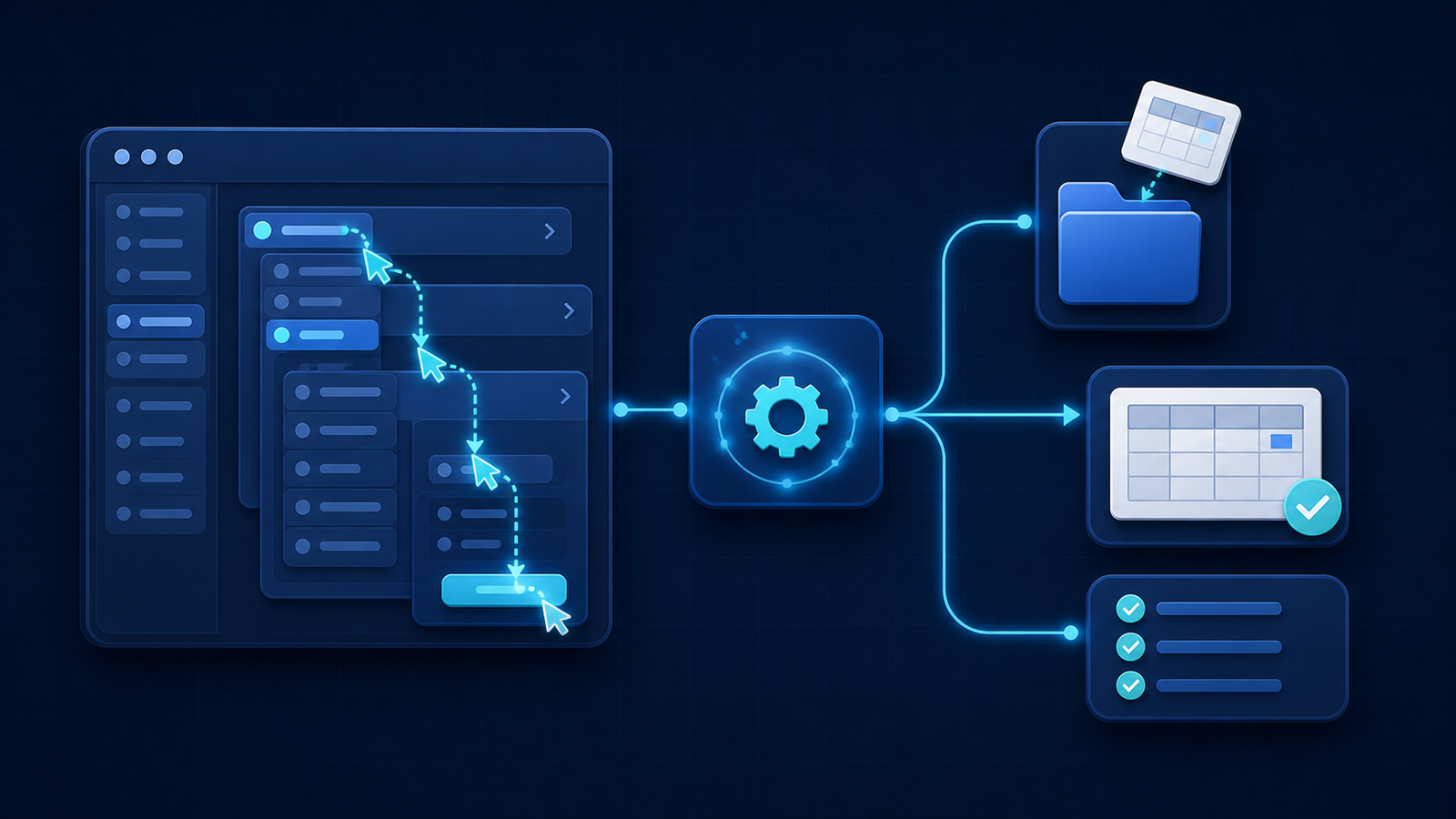
Teams keep clicking in the same places, opening several menus to complete one action, copying information from one screen to another, sending messages that are barely reviewed or too generic, and gradually using the software more out of constraint than comfort.
So the real issue is not always a lack of tools. It is often the fact that the tools already in place do not really match the way the work actually gets done.
When the team adapts to the software instead of the software adapting to the team
This is a common pattern in the small businesses, SMEs and service companies I support around La Rochelle.
At first, everyone just works around it. They learn the procedure, click where they are supposed to click and follow the expected sequence. Then that sequence becomes a habit. People stop thinking about what is on the screen and simply execute.
That is where the real problem begins.
When a team spends the day repeating the same gestures in the same order, the task becomes mechanical. It drains attention, increases the risk of mistakes and consumes time without creating any real value.
It is not always dramatic. Sometimes it is only a few extra clicks, two or three menus too many, one repetitive manipulation carried out over and over again. But over a week, then a month, that can easily turn into several hours lost.
And above all, it creates the impression that the software is heavy, when the real issue often sits in the workflow built around it.
Why business tools are so often underused
Business software is not designed for one company alone. It is designed for a market.
That is exactly why it can become difficult to use in a very specific working context. It tries to cover many use cases, many professions and many ways of operating. But a team does not need "many use cases". It needs to move quickly through its own recurring tasks.
That is usually where underuse appears.
Useful features remain hidden or too complicated to activate. Simple actions require too much navigation. Teams start taking shortcuts. They export, copy, paste, move files around and manually redo work the software might have handled differently if the workflow had been shaped around the reality on the ground.
In other words, the problem is not always the software itself. It is the gap between its logic and the team's real day-to-day work.
Automation does not mean replacing everything
When that gap becomes painful, many businesses assume they need to replace the tool.
That is not always the right answer.
In many situations, the best return comes from observing the manipulations teams repeat every day and removing the ones that bring no real value.
That is where thoughtful automation can change daily work without disrupting the organisation.
In some cases, I automate the repetitive manipulations themselves and keep a human validation step before the final action. In others, I adapt the existing workflow directly by adding a button, a trigger or a simpler logic inside the process people already use.
The goal is not to add another technical layer. The goal is to make the current tool easier to use, faster and more natural for the team.
What this looks like in practice
In practice, that can take several forms.
Sometimes a team keeps working in exactly the same environment as before, but part of the process now runs automatically in the background.
Sometimes a sequence that used to require several menus is reduced to one entry point.
Sometimes it becomes extremely simple: a file is dropped into the usual folder, the process starts, items are created or moved automatically, and one person reviews and validates the result.
What changes is not always the visible tool. What changes is the amount of unnecessary friction.
And that is often what makes the biggest difference in adoption.
Fewer clicks, fewer mistakes, stronger adoption
When automation is integrated well, teams do not experience it as a technical revolution. They experience it as relief.
In the situations I see, the tool becomes easier to accept because it demands less effort. Adoption can happen in under a month. And once a team sees that one repetitive task can genuinely disappear, it usually starts spotting other friction points worth improving.
That is often when other departments begin asking for automation in their own workflows.
So the benefit is not limited to time savings, even when the time savings are real. It also comes from giving the team back some comfort, focus and fluidity in everyday work.
What this kind of project reveals
The first lesson is that specialised software is not automatically well-used software.
The second is that a small repeated friction can cost far more than it seems.
The third is that the most useful automation is not always the most spectacular one. It is not always a complete rebuild or a brand-new tool. More often, it is the removal of useless clicks, a well-placed shortcut, a process triggered at the right moment or a manual step finally taken out of the workflow.
And finally, this kind of project highlights something essential: automation should not remove the human where the human is valuable. It should remove what is repetitive, tiring and avoidable.
How can you tell when your tools are underused?
The signals are usually quite simple.
Your team follows the same click sequence again and again. People copy data from one place to another. They open several menus to perform a basic action. They work around the software with files, copy-paste and parallel manipulations. They say the tool is powerful, but that it still wastes their time.
If that sounds familiar, you may not need a new piece of software. You may simply need a cleaner workflow.
That is exactly the kind of issue I help businesses tackle in La Rochelle and nearby: looking at what really happens, identifying the repetitive tasks that wear teams down, and finding what can be automated without breaking the useful habits already in place.
Conclusion
If your business already relies on a specialised software tool, but your team still loses time in repetitive manipulations, the answer may not be to replace everything.
The answer may simply be to remove what slows the work down for no good reason.
In La Rochelle, I support businesses that want to make better use of the tools they already have, automate repetitive tasks and regain a smoother way of working without starting from scratch.
If your team repeats the same task every day almost without thinking about it, it is probably a good candidate for automation.
Does your team repeat the same clicks every day? Let's look at the task together and see what can be automated without disrupting your organisation.